Payrolls may be prepared in advance in LawMaster which can be useful when you have pay runs over the Holiday Period.
When you are ready to process the pays for a future date go to Generate Timesheets and change the date to the Pay Date of the upcoming Pay Period e.g. 24 December.
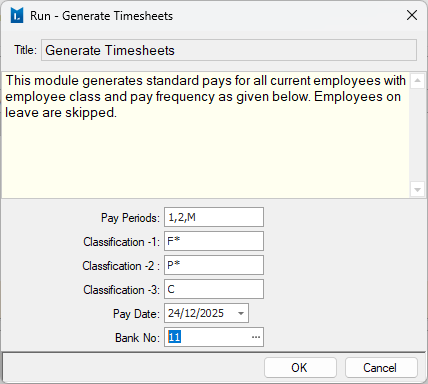
The pay period should populate automatically. Check the other two tabs to ensure pays have been generated for all employees. If any are missing, you can manually add them in Input/Review Timesheets.
Process the pays as normal, including any annual leave. When running Calculate Gross and Tax, ensure the pay date is set to the future dated Pay Date ie 24/12/2025.
When generating Direct Deposits, confirm both the Pay date and Bank Processing Date are 24/12/2025.
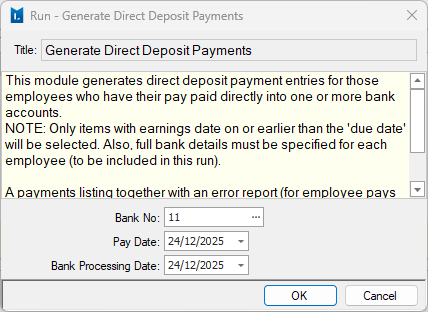
When you go to Produce Direct Deposit Files, ensure you select the correct pay run. When uploading the file to the bank, make sure the Pay Date is 24 December 2025.
Was this article helpful?
That’s Great!
Thank you for your feedback
Sorry! We couldn't be helpful
Thank you for your feedback
Feedback sent
We appreciate your effort and will try to fix the article